

When to Replace Spreadsheets and Manual Processes with Custom Software
Spreadsheets are where most business processes start, and for good reason. They are flexible, familiar, and free. A new workflow, a tracking requirement, a reporting need: The default response is to open a new sheet and start building. For early-stage processes and small teams, this works well enough.
But there is a point where spreadsheets stop scaling and start costing. Errors creep in. Data gets duplicated. Reporting takes hours because information is scattered across files that no one fully trusts. Decisions get made on numbers that might be wrong, and no one can say for certain either way.
If this sounds familiar, you are likely approaching the point where it makes sense to replace spreadsheets with custom software. This article is a practical guide for decision-makers trying to determine whether they have reached that threshold, what the alternatives look like, and how to move forward without unnecessary risk.
The Signs That Spreadsheets Are Holding Your Business Back
The problems with spreadsheet-dependent operations rarely arrive as a single dramatic failure. They accumulate gradually until the cost becomes impossible to ignore.
Here are the symptoms that matter.
- Version conflicts across teams: Multiple people are editing the same file, or worse, maintaining separate copies. No one is confident which version is current. Data gets overwritten, formulas break, and reconciliation becomes a recurring task that adds no value.
- Manual data entry across disconnected sheets: The same information is being typed into two, three, or more spreadsheets because there is no connection between them. Every manual entry is an opportunity for error, and every error compounds downstream.
- Reporting that takes hours instead of minutes: Pulling together a weekly or monthly report means gathering data from several spreadsheets, cross-referencing figures, reformatting outputs, and manually checking for inconsistencies. The people doing this work are usually the ones you need focused on higher-value tasks.
- Business logic is buried in formulas: Critical processes depend on complex formulas, macros, or pivot table configurations that one person built, and only that person understands. If they leave, go on holiday, or simply forget how a formula works, the process stalls.
- Compliance and audit gaps: Spreadsheets do not provide reliable audit trails. If your business needs to demonstrate who changed what, when, and why, spreadsheets cannot satisfy that requirement in any credible way.
- Onboarding takes weeks: New staff spend excessive time learning where things live, which sheet to use for which task, and which workarounds to follow. Processes that live in people’s heads rather than in systems are fragile, and they get more fragile as the team grows.
If you recognise three or more of these, spreadsheets are no longer serving your business. They are constraining it.
What Spreadsheets Do Well (and When They Are Still the Right Tool)
It would be dishonest to suggest that every spreadsheet should be replaced. Spreadsheets remain excellent tools in the right context:
- Spreadsheets are ideal for early-stage processes where requirements are still forming, and flexibility matters more than structure.
- They work well for ad hoc analysis, one-off calculations, quick data exploration, and prototyping a workflow before committing to something more permanent.
- For a small team managing a simple process with low compliance risk, a well-maintained spreadsheet can be perfectly adequate.
The threshold is this: When a process is repeated frequently, involves multiple users or teams, requires audit trails, handles sensitive data, or feeds into decisions that carry commercial or compliance risk, spreadsheets become a liability rather than a tool.
This is not about the size of the spreadsheet. It is about the weight of what depends on it.
What Custom Software Gives You That Spreadsheets Cannot
The decision to replace spreadsheets with custom software is ultimately about resolving operational pain that spreadsheets are structurally incapable of addressing.
- Role-based access and permissions: Custom software lets you control who sees what, who can edit what, and who can approve what. Spreadsheets offer little meaningful access control.
- Automated workflows: Tasks that currently require manual handoffs, email reminders, or someone remembering to update a sheet can be automated. When one step completes, the next triggers automatically. This reduces delays, eliminates forgotten steps, and frees your team from chasing the process.
- Audit trails and compliance-ready logging: Every action is recorded: Who did what, when, and what changed. For regulated industries or businesses preparing for audit, this is a baseline requirement.
- Integrations with existing systems: Custom software connects to your CRM, finance tools, payment systems, communications platforms, and anything else your business runs on. Data flows between systems automatically, eliminating the manual re-entry that creates errors and wastes time.
- Scalability: Spreadsheets degrade as data volume and user numbers grow. Performance slows, complexity increases, and the risk of errors rises in proportion. Custom software is built to handle growth without degrading.
- Dashboards and live reporting: Instead of assembling reports manually from multiple sources, custom software delivers dashboards built on live, reliable data. Decision-makers get accurate information when they need it, without waiting for someone to compile it.
What the Transition from Spreadsheets to Software Looks Like
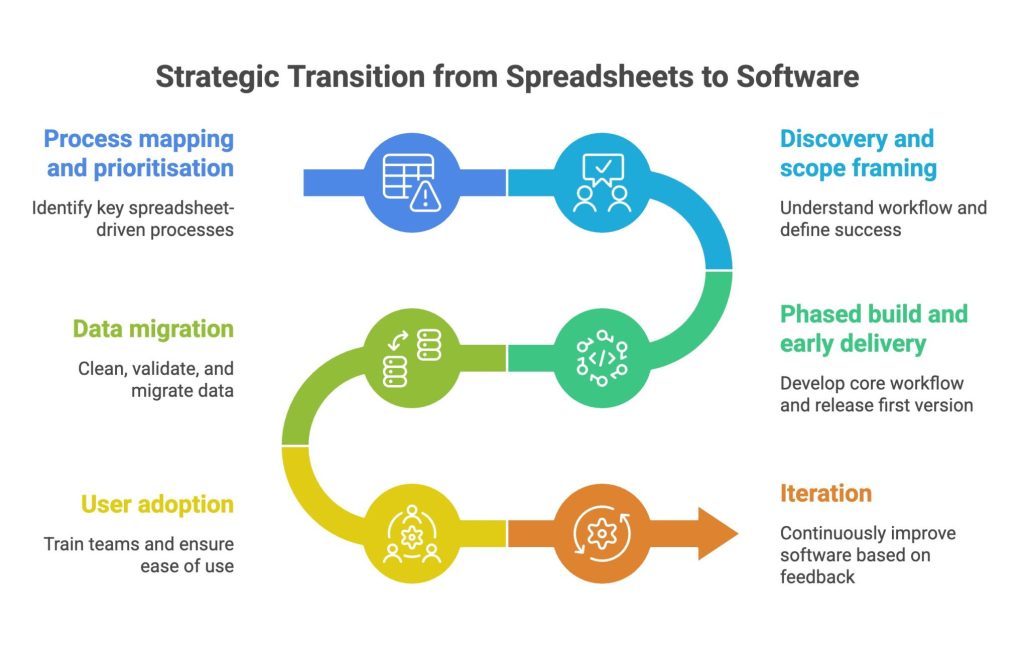
The transition is not a big-bang replacement. Attempting to rebuild everything at once is expensive, risky, and unnecessary. A phased approach is more practical and delivers value faster.
- Process mapping and prioritisation: Start by identifying which spreadsheet-driven processes cause the most pain, carry the most risk, or consume the most time. Not every process needs to move at once. Focus on the one where the impact will be most immediate and measurable.
- Discovery and scope framing: Before any code is written, the workflow needs to be understood properly: What the process does, who uses it, what data it handles, what systems it connects to, and what success looks like. This phase prevents costly misalignment later.
- Phased build and early delivery: The first version of the software should address the core workflow and be usable quickly. Subsequent phases add features, integrations, and refinements based on real usage and feedback. This approach manages risk and ensures the software reflects how your team actually works, not how someone imagined they would.
- Data migration: Existing data in spreadsheets needs to be cleaned, validated, and migrated into the new system. This is often more complex than expected, particularly when data formats are inconsistent or records are incomplete. Planning for it early avoids delays at launch.
- User adoption: The best software fails if teams do not use it. Training, onboarding support, and a clear explanation of why the change is happening all matter. So does designing software that is genuinely easier to use than the spreadsheet it replaces.
- Iteration: After launch, the software improves based on real-world performance and evolving business needs. This is not a one-off project. It is an ongoing capability that gets better over time.
Businesses that replace spreadsheets with custom software using this phased model see results faster and avoid the common pitfalls of over-scoped, under-delivered technology projects.
Move Beyond Spreadsheets With Confidence
Xanda helps businesses replace spreadsheets with custom software that is secure, scalable, and built around the workflows that matter most. With over 27 years of experience delivering operational platforms for government, regulated organisations, and ambitious SMEs, we build what we recommend and support what we build.
If you are managing critical operations in spreadsheets and know it is time to move forward, book a free consultation to discuss your project.
FAQs
1. When Should a Business Replace Spreadsheets with Custom Software?
The clearest signal is when spreadsheets are creating more problems than they solve: Version conflicts, manual data entry across disconnected files, reporting that takes hours, business logic only one person understands, and compliance gaps that put the organisation at risk. When a process is repeated frequently, involves multiple users, handles sensitive data, or feeds into high-stakes decisions, it has outgrown what spreadsheets can reliably support.
2. How Much Does Custom Software Cost Compared to Spreadsheets?
Spreadsheets appear free, but the hidden costs are significant: Staff time spent on manual data handling, errors that lead to poor decisions, rework caused by version conflicts, and compliance exposure. Custom software requires upfront investment, but the return comes through reduced manual effort, fewer errors, faster reporting, and the ability to scale operations without adding headcount in proportion. Costs depend on scope and complexity, which is why a phased approach helps manage investment against measurable results.
3. How Long Does It Take to Build Custom Software to Replace Manual Processes?
A first working version addressing the highest-priority workflow can typically be delivered within weeks, not months. From there, the software expands in phased cycles. The timeline depends on the complexity of the process, the number of integrations required, and the state of existing data. A clear discovery phase at the start gives you a realistic timeline before any build commitment.
4. Can Custom Software Integrate with the Tools We Already Use?
Yes. Custom software is built to connect with your existing systems, including CRM, finance, payments, communications, and document management platforms. API integrations allow data to flow between systems automatically, eliminating the manual re-entry that spreadsheets require. The integration landscape is assessed during discovery to ensure the solution fits your existing technology stack.
5. What Happens to Our Existing Data When We Switch from Spreadsheets?
Existing data is cleaned, validated, and migrated into the new system as part of the transition. This process accounts for inconsistent formats, incomplete records, and duplicate entries. Data migration is planned and tested before launch to ensure accuracy and continuity. Your historical data is preserved and becomes more useful inside a system designed to manage it properly.