

How AI Is Changing Custom Software Development Without Replacing Engineers
The role of AI in custom software development is growing fast, and so is the hype around it. Headlines suggest that AI will soon build entire platforms without human involvement, cutting costs and timelines dramatically. For decision-makers investing in bespoke software, this narrative is misleading and commercially dangerous.
The reality is more nuanced. AI tools are genuinely useful at specific stages of software delivery. They can speed up research, reduce repetitive work, and improve consistency across documentation and testing. But they cannot replace the engineering judgement, security thinking, and architectural accountability that custom software demands, particularly for regulated organisations and business-critical platforms.
Where AI Genuinely Accelerates Custom Software Development
AI tools are most effective when applied to well-defined, repeatable tasks within a structured delivery process. Here is where they deliver genuine productivity gains.
1. Research and Requirements Gathering
AI can accelerate early-stage research by summarising competitor platforms, synthesising user feedback, analysing documentation from legacy systems, and drafting initial requirements based on stakeholder input. Tasks that used to take days of manual review can now be completed in hours, giving teams a faster route to a well-informed discovery phase.
Where it falls short: AI cannot assess commercial viability, challenge assumptions, or identify unstated business constraints. A skilled product lead still needs to shape the output into something actionable.
2. Documentation
AI tools are effective at generating and maintaining technical documentation, including API references, onboarding guides, architecture decision records, and release notes. They reduce the documentation debt that slows many projects down after launch.
Where it falls short: AI-generated documentation tends to be generic unless tightly prompted and reviewed. Without human editing, it often lacks the context that makes documentation genuinely useful to the teams relying on it.
3. Code Scaffolding
AI-assisted coding tools can generate boilerplate code, suggest patterns, and scaffold repetitive components faster than manual coding. This is useful for standard CRUD operations, form handling, data models, and initial API structures.
Where it falls short: Scaffolded code still needs to be reviewed for security, consistency with the broader architecture, and alignment with project conventions. AI does not understand the design intent behind a codebase; it predicts what code should look like based on patterns, which is a fundamentally different thing.
4. Test Generation
AI can draft unit tests, integration tests, and edge-case scenarios based on existing code and specifications. This is one of the highest-value applications, as it helps teams improve test coverage without proportionally increasing manual effort.
Where it falls short: AI-generated tests can create a false sense of security. They may test what the code does rather than what it should do, missing the logic errors that matter most. Human testers still need to define acceptance criteria, review coverage gaps, and validate that tests reflect real-world usage.
5. Release Preparation
AI can assist with changelog generation, deployment checklists, environment configuration checks, and pre-release validation summaries. These are time-consuming, error-prone tasks that benefit from automation.
Where it falls short: Release decisions still require human judgement. Assessing risk, coordinating with stakeholders, and making go/no-go calls are responsibilities that cannot be delegated to an AI tool.
Why Human Engineers Still Control What Matters
The stages that define whether a software project succeeds or fails are the ones that AI handles least well.
1. Architecture Decisions
Choosing the right architecture for a custom platform involves balancing performance, scalability, maintainability, cost, and team capability. These are contextual decisions that depend on business goals, user volumes, integration requirements, and long-term product direction. AI tools can suggest patterns, but they cannot weigh trade-offs that span technical and commercial domains.
2. Security Design
Security in custom software is not a layer added at the end. It is built into authentication flows, data handling, role-based access, encryption, audit logging, and infrastructure configuration from the start. AI tools can flag known vulnerabilities and suggest fixes, but they cannot design a security model tailored to a specific organisation’s compliance requirements, data sensitivity, and risk profile.
For regulated organisations, this distinction is critical. A security approach shaped by AI pattern-matching, without experienced human oversight, creates liability.
3. Code Review
AI-assisted code review tools can catch syntax errors, flag common anti-patterns, and identify potential performance issues. But meaningful code review goes further: assessing whether the approach is appropriate, whether it aligns with the wider system design, whether it introduces hidden dependencies, and whether it will be maintainable by the team over time. This requires understanding of the project’s history, goals, and technical culture.
4. Edge-Case Handling
Custom software often needs to handle unusual but critical scenarios: Unexpected data formats from third-party integrations, rare but high-impact user workflows, failure modes in distributed systems, and regulatory edge cases. AI tools tend to optimise for common patterns, which is precisely the opposite of what edge-case handling requires.
5. Integration Complexity
Connecting a new platform with existing CRM, finance, logistics, payments, and communications systems involves navigating inconsistent APIs, legacy data structures, authentication protocols, and business rules that are often poorly documented. This is hands-on, investigative engineering work that AI cannot automate in any reliable way.
6. Accountability
When a platform goes down, exposes data, or fails an audit, someone needs to be accountable. AI tools do not carry professional responsibility. Human engineers, architects, and delivery leads do. For any business investing in custom software, this accountability is non-negotiable.
The Risks of Over-Relying on AI in Software Projects
AI in custom software development delivers clear benefits when used within a disciplined process. When used without sufficient oversight, it introduces risks that compound over time.
1. Technical Debt
AI-generated code is often functional but structurally inconsistent. When multiple developers lean on AI suggestions without coordinating around shared conventions, the codebase fragments. Patterns diverge, naming conventions drift, and refactoring becomes progressively harder. The speed gained in the short term is repaid with interest during maintenance.
2. Security Gaps
AI coding tools are trained on publicly available code, which includes insecure patterns. Without experienced review, AI-generated code can introduce vulnerabilities: Hardcoded credentials, insufficient input validation, insecure default configurations, and improper error handling. These are not hypothetical risks. They are documented, recurring issues in projects that treat AI output as production-ready without scrutiny.
3. Hallucinated Logic
Large language models can generate code that looks correct but contains fabricated logic, calling functions that do not exist, referencing APIs with invented parameters, or producing algorithms that fail under real-world conditions. In a prototyping context, this is manageable. In a production environment handling sensitive data or financial transactions, it is dangerous.
4. Inconsistent Architecture
When AI tools generate code in isolation from the broader system design, the result is often a patchwork of incompatible approaches. One module might use one data access pattern while another uses something entirely different, not because of a deliberate design decision, but because the AI tool optimised for local context rather than system-wide coherence.
What AI-Accelerated Delivery Looks Like in Practice
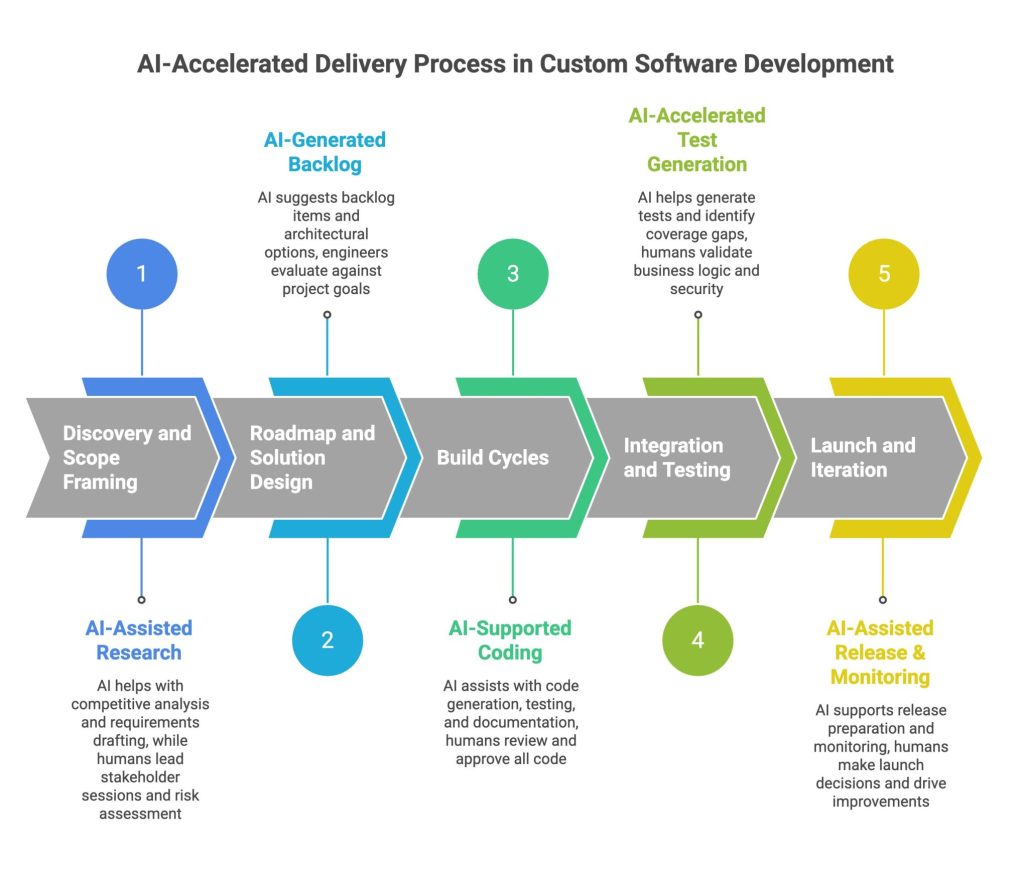
A responsible approach to AI in custom software development integrates AI tools into a structured delivery process, rather than treating them as a shortcut. Here is what that looks like across a typical project lifecycle.
1. Discovery and Scope Framing
AI assists with research, competitive analysis, and initial requirements drafting. Human leads run stakeholder sessions, challenge assumptions, define success criteria, and identify risks and dependencies that AI cannot surface.
2. Roadmap and Solution Design
AI can help generate initial backlog items, draft user stories, and suggest architectural options based on the technology stack. Engineers and architects evaluate these suggestions against the project’s commercial goals, security requirements, integration landscape, and long-term scalability needs.
3. Build Cycles
During development, AI tools support code generation, test scaffolding, documentation, and code review. Engineers write, review, and approve all production code. AI output is treated as a draft, never as a finished deliverable. Every merge goes through human review against project standards.
4. Integration and Testing
AI accelerates test generation and helps identify coverage gaps. Human testers define acceptance criteria, validate business logic, and run integration tests against real systems. Security reviews and penetration testing remain human-led.
5. Launch and Iteration
AI supports release preparation, monitoring setup, and post-launch documentation. Launch decisions, incident response, and performance optimisation remain under human control. As the platform evolves, AI continues to accelerate routine tasks while engineers focus on improvements that require deeper judgement.
This model delivers faster, more consistent output without sacrificing the oversight that serious organisations require.
How to Choose a Development Partner That Uses AI Responsibly
The growing role of AI in custom software development makes partner selection more important, not less. Here is what to look for and what to question.
What to Ask
Ask how AI is used in their delivery process. A credible partner will give you a specific answer: Which tools, at which stages, with what level of human oversight. Vague claims about “AI-powered development” without detail should raise concerns.
Ask who is accountable for code quality, security, and architectural decisions. If the answer involves AI tools rather than named individuals or defined roles, that is a red flag.
Ask how they handle AI-generated code in production. Look for a clear review and approval process, not a workflow where AI output goes straight into the codebase.
What to Look For
Look for a partner with proven delivery experience in your sector, particularly if you operate in a regulated or security-sensitive environment. AI tools do not reduce the need for domain expertise; they amplify the output of the team using them, for better or worse.
Look for a transparent commercial model. AI-accelerated delivery should improve efficiency, but that efficiency should be reflected in clearer scoping, better documentation, and more predictable delivery, not in unrealistic timeline promises.
Red Flags
Be cautious of partners who promise that AI will cut development timelines by 70% or 80% without caveats. AI accelerates parts of the process, but discovery, architecture, integration, security, and stakeholder alignment still take the time they take.
Be cautious of partners who cannot explain where human oversight sits in their workflow. If AI is doing the heavy lifting and humans are doing light review, the quality and security model is inverted.
What Should I Look for in an AI-Accelerated Development Partner?
Look for a partner who can explain exactly how AI fits into their delivery process, who is accountable for quality and security decisions, and how AI-generated output is reviewed before it reaches production. Strong indicators include proven experience in your sector, a transparent commercial model, disciplined engineering standards, and long-term support after launch. Be cautious of partners making aggressive timeline promises based on AI capabilities alone.
Xanda builds secure, scalable custom software using AI-accelerated delivery, with experienced engineers accountable at every stage. With over 27 years of experience delivering for government, regulated organisations, and ambitious SMEs, we combine disciplined engineering with modern AI in custom software development to move faster without cutting corners.
If you are planning a new platform, modernising an existing system, or exploring how AI can improve your software delivery, book a free consultation to discuss your project.
FAQs
1. What Does AI-Accelerated Software Development Mean?
AI-accelerated software development uses AI tools to speed up specific stages of the delivery process, including research, documentation, code scaffolding, test generation, and release preparation. Experienced engineers remain accountable for architecture, security, code quality, and all production decisions. The goal is faster, more consistent delivery without compromising governance or reliability.
2. Can AI Replace Software Engineers?
No. AI tools can automate repetitive tasks and generate draft outputs, but they cannot make architectural decisions, design security models, handle complex integrations, or take accountability for production systems. Custom software development for business-critical platforms requires human judgement at every stage. AI is a productivity tool, not a replacement for engineering expertise.
3. How Does AI Improve Software Testing and Quality Assurance?
AI tools can generate unit tests, integration tests, and edge-case scenarios based on existing code and specifications. This helps teams increase test coverage without a proportional increase in manual effort. However, AI-generated tests must be reviewed by human testers who define acceptance criteria, validate business logic, and ensure tests reflect real-world usage rather than simply mirroring what the code already does.
4. Is AI-Generated Code Secure Enough for Business-Critical Applications?
Not without experienced human review. AI coding tools are trained on publicly available code, which includes insecure patterns. AI-generated code can introduce vulnerabilities such as insufficient input validation, insecure defaults, and improper error handling. For business-critical and regulated applications, every piece of AI-generated code must go through security review and be held to the same standard as manually written code.